Nextflow pipelines for Twitcher analyses
Twitcher and Twitcher Workbench are tools for identification and annotation of mutation clusters created by short-range template switching. Find more information about the tools at https://twitcher.it.helsinki.fi.
Nextflow provides a convenient way to run bioinformatic pipelines on a HPC as it can install and run the applications automatically through containers. Below, we describe a set of Nextlow pipelines for typical Twitcher analyses.
Download the pipelines with git:
git clone https://github.com/ariloytynoja/twitcher_nextflow.gitAnalysis of de novo genome assemblies
Long-read sequencing data can be fairly easily assembled into contig-level draft genomes. Analysis of genome assemblies is expected to be the fastest and most accurate way of analysing TSMs with Twitcher. Analysis of VCFs is approximately as fast but may miss mutation clusters due to variant calling errors. Analysis of HiFi BAMs allows identifying somatic events but, due to the great number of events, is much slower.
The pipeline twitcher_asm_nf:
- aligns a genome assembly against a reference using
minimap2 - runs
twitcheron the resulting BAM files - processes and filters the CSV output files with
twb cli
An example command:
nextflow run main.nf --assembly data/NA12878.verkko_asm.fa.gz [ --prefix NA12878.verkko_asm ]If the assembly is already aligned, one can start from the BAM file:
nextflow run main.nf --bam results/alignments/NA12877.verkko_asm.bam [ --prefix NA12877.verkko_asm ]By default, the postprocessed and filtered output will be placed under results/twb/filtered/. The full processed data are stored under results/twb/$name/ and can be imported and filtered within TWB.
The default settings (in nextflow.config) were used on a SLURM system with options:
#SBATCH --ntasks=1
#SBATCH --cpus-per-task=20
#SBATCH --mem=80G
This (and possibly less) should be sufficient for an analysis of a human sample using minimap2 as the aligner (peak memory 44.5 GB), but may run out of memory with winnowmap (provided as an alternative aligner). Providing 4GB per Twitcher thread (e.g., 20 CPUs and 80GB, or 10 CPUs and 40GB) will fail with OOM on low-complexity regions but should succeed in typical genic regions.
Note that the pipeline defines --db as a shared resource. This speeds up subsequent analyses as mutation clusters segregating among individuals are resolved without re-alignment. Twitcher should allow some multiple parallel instances to read and write the database, but starting too many parallel runs (e.g., for tens of individuals) may cause errors.
The pipeline is designed for human data and GRCh38. Analyses with any other reference require building the matching annotation files for twb cli (explained on the Twitcher website) or disabling the gene and repeat annotation.
By default, the analysis is performed on regions combining the GIAB not difficult regions and refseq CDS regions that together make 76.1% of the genome. See the GIAB README files for the not difficult regions and refseq CDS regions for the description.
The expected timeline of a plain Twitcher analysis (with a prealigned BAM) may look like this:
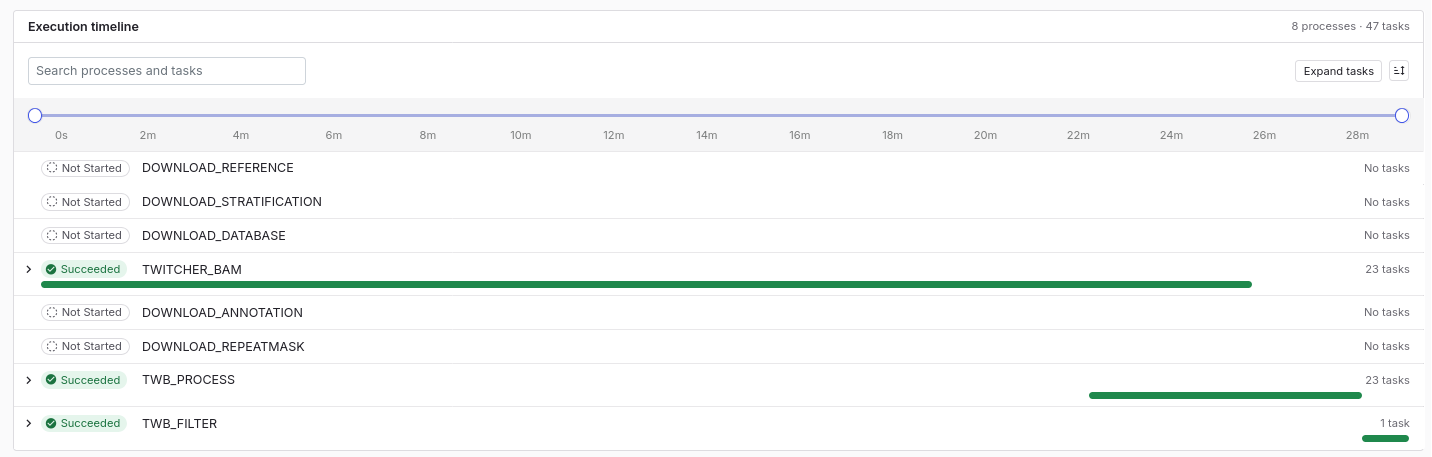
Twitcher is expected to get increasingly fast as an ever greater proportion of the segregating mutations are stored in the DB.
Analysis of VCF data
The pipeline twitcher_vcf_nf:
- runs
twitcheron a VCF file, possibly usin a BAM file for phasing - processes and filters the CSV output files with
twb cli
An example command:
nextflow run main.nf --vcf HG002_novaseq.hard-filtered.vcf.gz --bam HG002_novaseq.bam \
 [ --copy_bam ] [ --prefix HG002.dragen ]
The option --copy_bam copies BAM-formatted phasing data to results/alignments/ for visualisation with TWB (see below):
Twitcher accepts CRAM format but the script assumes the index file to be ${bam}.bai. If not defined with --bai file.cram.cai, the index file is not found and is recomputed:
nextflow run main.nf --vcf HG002_novaseq.hard-filtered.vcf.gz \
  --bam HG002_novaseq.cram --bai HG002_novaseq.cram.crai [ --prefix HG002.dragen ]
If the VCF is fully phased, no BAM is required:
nextflow run main.nf --vcf variants_GRCh38_all_HGSVC2024v1.0_NA24385.vcf.gz \
  [ --prefix HG002.HGSVC ]
By default, the postprocessed and filtered output will be placed under results/twb/filtered/. The full processed data are stored under results/twb/$name/ and can be imported and filtered within TWB.
The pipeline is designed for human data and GRCh38. By default, the analysis is performed for the GIAB “not gene not difficult” regions (see above).
Analysis of HiFi BAM data
The pipeline twitcher_hifi_nf:
- runs
twitcheron a PacBio HiFi BAM file - processes and filters the CSV output files with
twb cli
An example command:
nextflow run main.nf --bam HG002_PacBio-HiFi-GIABv3.bam [ --prefix HG002.hifi_bam ] [ --chrom chr1 ]The option --chrom allows selecting only one chromosome and thus running multiple chromosomes parallel with separate jobs. Due to huge numbers of de novo mutations, analyses of HiFi files can be slow.
By default, the postprocessed and filtered output will be placed under results/twb/filtered/; if --chrom is used, they are suffixed with the chromosome name and need to be concatenated manually. csvtk is included in the TWB image:
singularity exec -B $PWD:$PWD singularity_cache/aryashta-twb-v0.8.4.img csvtk concat \
  results/twb/filtered/$prefix.chr*.filter3.csv > results/twb/filtered/$prefix.filter3.csv
The pipeline is designed for human data and GRCh38. By default, the analysis is performed for the GIAB “not gene not difficult” regions (see above).
Visualisation of results within Twitcher Workbench
The Twitcher results can visualised and further processed within Twitcher Workbench. The files do not necessarily need to be copied outside the (possibly secure) server, but TWB can be run from server and the results viewed directly from the output directories. If the default options options were used, the results can be visualised with the script twb_serve.sh:
ssh userna@hostname -L 8001:localhost:8001

cd /path/to/twitcher_nextflow/twitcher_asm_nf

./bin/twb_serve.sh
Click the link to open TWB in a browser or copy-paste http://localhost:8001 to the browser URL field.
Note that Twitcher accepts CRAM-formatted data but only BAMs can be visualised in TWB.